
Introduction
If you’ve recently encountered the message "Your organization requires you to restart your computer" on your Windows device, you may be wondering what it means and why it's important. This article aims to clarify this message and provide you with a better understanding of Windows updates and their significance.
What Does This Message Mean?
The message indicates that there are pending updates on your computer that require a restart to complete the installation process. These updates are typically managed by your organization's IT department, and the message serves as a reminder that your device needs to be restarted to ensure it remains secure and up to date.
Types of Updates
Windows updates can include:
Security Updates: These are critical for protecting your device from vulnerabilities and threats.
Feature Updates: These introduce new features and improvements to the operating system.
Quality Updates: These fix bugs and enhance the performance of the system.
Why Restarting is Necessary
Restarting your computer allows the updates to be fully applied. Some updates require system files to be replaced or modified, which can only happen when the system is not in use. Failure to restart may lead to incomplete installations, which can compromise system stability and security.
What Should You Do?
When you see this message, here are some steps you can take:
Save Your Work: Before restarting, make sure to save any open documents or files to prevent data loss.
Restart Your Computer: You can either restart immediately or schedule a restart for a later time, depending on your organization's policy.
Check for Updates: After restarting, you can check for additional updates by going to:
Settings > Update & Security > Windows Update.
Click on "Check for updates" to ensure your system is fully updated.
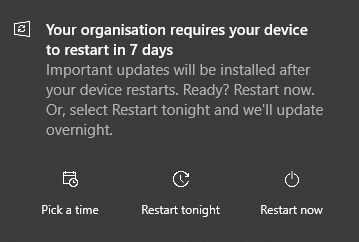
If you have updates available you may see this message pop up on your screen.